
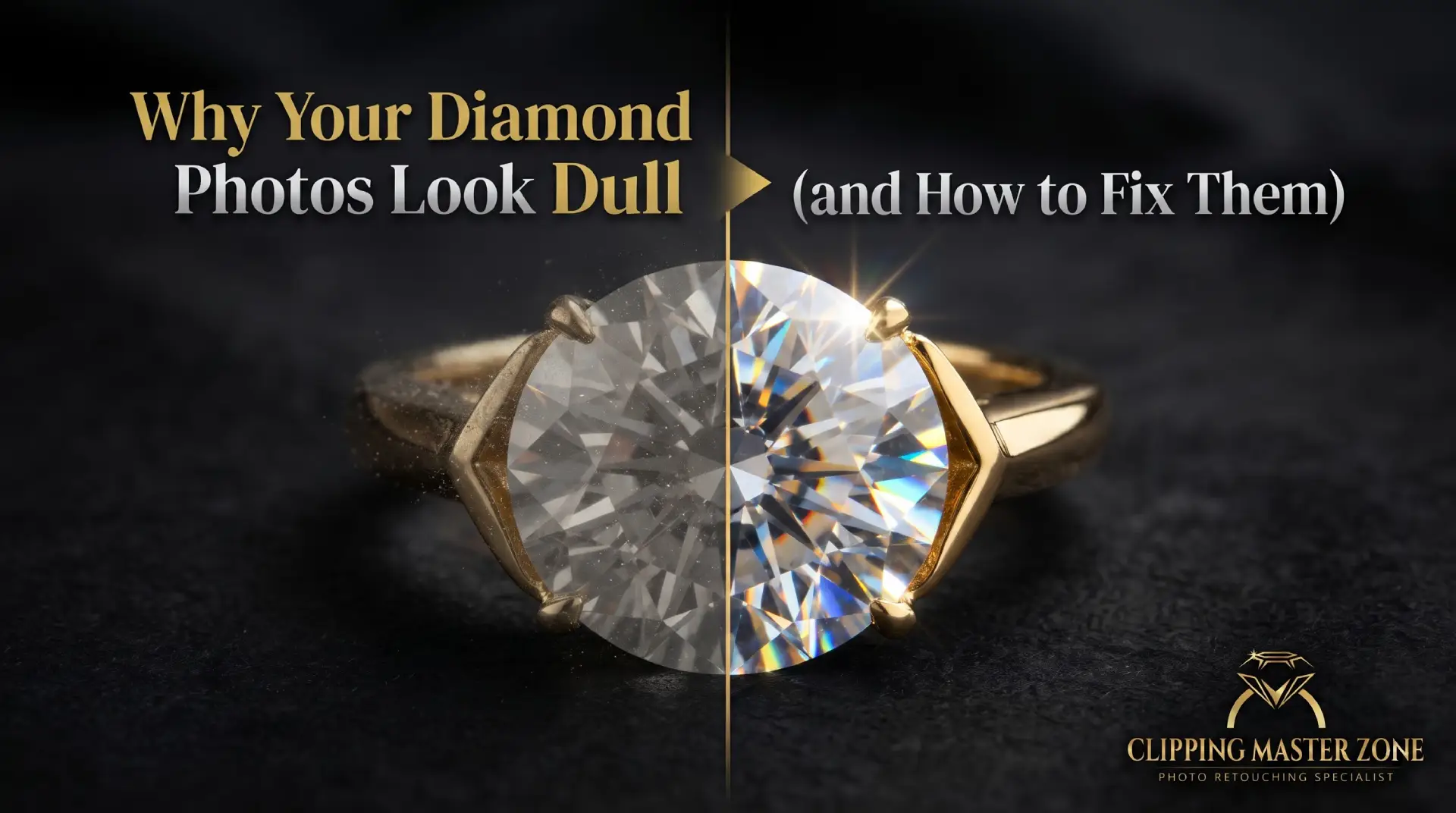
Diamonds are known for their brilliance, sparkle and beautiful light reflections. However, capturing these qualities in a photograph is not always easy. Even an expensive diamond can look dull, grey or lifeless when the lighting, camera settings or editing are not handled correctly.
If you sell diamond rings, engagement rings, necklaces or other jewellery products online, dull product photographs can affect how customers perceive your collection.
So, how to edit diamond photos to make them look brighter, clearer and more attractive without making them appear artificial?
The answer involves a combination of proper photography, careful retouching, colour correction, highlight adjustment and detailed gemstone enhancement.
At Clipping Master Zone, we provide professional jewellery photo editing and diamond retouching services to help jewellery retailers, manufacturers, photographers and ecommerce businesses improve their product images. Our editing approach focuses on enhancing the natural appearance of diamonds while preserving their original design and details.
Why Do Diamond Photos Look Dull?
Before learning how to improve diamond photographs, it is important to understand why diamonds sometimes lose their sparkle in pictures.
A diamond interacts with light through its facets and internal reflections. If the lighting or camera setup is unsuitable, these details may not appear clearly in the final photograph.
Here are some common reasons why diamond photos look dull.
1. Poor Lighting Conditions
Lighting plays a major role in diamond photography. If the light is too weak, too harsh or incorrectly positioned, the diamond may appear dark or flat.
Common lighting problems include:
- Insufficient light around the diamond.
- Uneven lighting across the jewellery.
- Excessive highlights that hide gemstone details.
- Unwanted reflections from nearby objects.
- Incorrect light positioning.
How to fix it: Use controlled lighting and adjust the light direction to capture the diamond’s facets and reflections. During editing, carefully balance brightness, highlights and contrast without removing natural details.
2. Incorrect Exposure and Brightness
Incorrect exposure can make diamond photographs appear too dark or too bright.
Underexposed images may hide the diamond’s facets, while overexposed images can lose important details in bright areas.
How to fix it: Adjust exposure, brightness and highlights carefully. Avoid increasing brightness too much because excessive adjustments can make the diamond look flat and remove its natural depth.
3. Unwanted Reflections and Colour Casts
Diamonds and polished jewellery surfaces can reflect surrounding objects, lighting equipment and nearby colours.
These reflections may create unwanted yellow, blue, grey or other colour casts in the photograph.
How to fix it: Use colour correction and selective retouching to reduce distracting colour casts while preserving realistic reflections. The goal is to maintain a natural diamond appearance rather than create an artificial white gemstone.
4. Dust, Fingerprints and Surface Marks
Tiny dust particles and fingerprints can become very noticeable in close-up diamond photography.
Even a small mark can distract viewers from the gemstone’s facets and overall appearance.
How to fix it: Use detailed retouching techniques to remove unwanted dust, fingerprints and distracting marks while preserving the original stone structure and jewellery details.
5. Lack of Contrast and Facet Definition
A diamond may appear flat when its facets are not clearly visible. This can happen because of poor lighting, incorrect exposure or insufficient contrast.
How to fix it: Carefully adjust contrast, highlights and local tonal balance to improve facet visibility. Avoid excessive sharpening or contrast because these can create unnatural edges and harsh reflections.
How to Edit Diamond Photos: 7 Professional Editing Techniques
Professional diamond retouching requires attention to small details. The objective is to improve the photograph while keeping the diamond realistic.
Here are seven important techniques used in professional diamond photo editing.
1. Adjust Brightness and Exposure
Start by correcting the overall exposure of the photograph.
Check whether the diamond is too dark or whether bright areas have lost detail. Make gradual adjustments rather than increasing brightness across the entire image without checking the result.
Focus on:
- Improving overall visibility.
- Balancing dark and bright areas.
- Preserving gemstone details.
- Avoiding overexposed highlights.
- Maintaining natural metal tones.
Proper exposure correction can make a significant difference to the final product image.
2. Improve Diamond Contrast and Clarity
Contrast helps separate different facets and reflective areas of a diamond.
Careful contrast adjustments can improve the visual definition of the stone and make its structure easier to see.
Professional editing may involve:
- Selective contrast adjustment.
- Highlight and shadow balancing.
- Local clarity enhancement.
- Careful sharpening.
- Refinement of visible gemstone details.
At Clipping Master Zone, our diamond retouching services focus on improving image clarity while maintaining the natural appearance of the original jewellery photograph.
3. Correct Diamond and Jewellery Colours
Diamond photographs can sometimes appear yellow, blue or grey because of incorrect white balance or surrounding reflections.
Colour correction helps improve the overall colour balance of the image.
Important adjustments include:
- Correcting unwanted colour casts.
- Balancing white and neutral areas.
- Maintaining natural metal colours.
- Preserving coloured gemstone tones.
- Creating consistency across product collections.
For jewellery brands, accurate colour representation is important because customers use product photographs to understand what they are purchasing.
4. Remove Dust and Unwanted Marks
Dust removal is an essential part of detailed diamond retouching.
Use appropriate retouching techniques to clean small imperfections without damaging the original gemstone details.
Common corrections include:
- Removing dust particles.
- Cleaning fingerprints.
- Correcting small distracting spots.
- Removing unwanted background marks.
- Refining visible metal imperfections where appropriate.
Professional jewellery photo retouching should improve the product image without changing the actual jewellery design.
5. Enhance Diamond Facets and Reflections
A diamond’s appearance depends heavily on its facets and the way light interacts with them.
Editing can improve the visibility of these details through careful tonal adjustments and selective retouching.
Useful techniques include:
- Improving facet definition.
- Balancing highlights and reflections.
- Enhancing local contrast.
- Reducing distracting glare.
- Preserving natural light patterns.
Avoid adding fake sparkle or unrealistic reflections. Excessive enhancement can make a diamond look digitally altered rather than professionally photographed.
6. Refine Jewellery Metal and Background
Diamond jewellery often includes gold, silver, platinum or white gold settings. These materials also need attention during editing.
Professional retouching may include:
- Cleaning metal surfaces.
- Correcting gold and silver colours.
- Refining prongs and setting details.
- Removing unwanted background distractions.
- Creating clean white backgrounds.
- Improving product shadows.
If you need clean and precise product edges, explore our Clipping Path Services in the UK.
For complete jewellery image enhancement, Clipping Master Zone also provides Jewellery Photo Editing Services in the UK.
7. Maintain Natural Diamond Sparkle
One of the biggest mistakes in diamond editing is adding too much brightness, sharpening or artificial sparkle.
Professional retouching should improve the visual presentation of a diamond without making it look unrealistic.
To maintain a natural appearance:
- Preserve the original facet structure.
- Avoid excessive highlights.
- Maintain realistic reflections.
- Do not over-whiten the gemstone.
- Keep the original jewellery proportions.
- Compare the edited image with the original photograph.
The final photograph should look clean, bright and attractive while remaining a believable representation of the actual product.
Common Mistakes to Avoid When Editing Diamond Photos
Even when using professional editing software, certain mistakes can reduce the quality of diamond photographs.
Avoid these common problems:
- Overexposure: Excessive brightness can remove important diamond details.
- Artificial Sparkle: Too many added star effects can make jewellery look unrealistic.
- Incorrect White Balance: Unwanted colour changes can misrepresent the diamond and metal.
- Excessive Sharpening: Harsh edges can damage the natural appearance of the gemstone.
- Over-Retouching: Removing too much detail can change the original product appearance.
- Unnatural Backgrounds: Poor background editing can make product images look inconsistent.
- Inconsistent Editing: Different editing styles across a product catalogue can weaken brand presentation.
A professional editor should balance visual improvement with accurate product representation.
Which Software Can You Use to Edit Diamond Photos?
Different software tools can be used for diamond and jewellery photo editing. The right choice depends on the editing requirements and the user’s experience.
Adobe Photoshop is widely used for detailed jewellery retouching because it provides tools for precise selections, colour correction, layer-based editing and image refinement.
Other useful tools include:
- Adobe Lightroom: Useful for exposure, white balance and overall colour adjustments.
- Adobe Camera Raw: Helps correct exposure, highlights, shadows and colour.
- Adobe Photoshop: Suitable for detailed dust removal, gemstone retouching, background refinement and selective corrections.
For complex diamond photographs, a combination of photography adjustments and detailed Photoshop retouching can produce better results than relying on automatic filters alone.
Why Professional Diamond Photo Retouching Matters for UK Jewellery Businesses
UK jewellery businesses often use product photographs across ecommerce websites, online marketplaces, digital catalogues and promotional campaigns.
Customers rely on these images to understand gemstone details, metal colours and jewellery designs.
Professional diamond photo retouching can help businesses:
- Present diamond jewellery more clearly.
- Maintain consistent product image quality.
- Improve the visual appearance of ecommerce listings.
- Create clean and organised product catalogues.
- Maintain natural gemstone and metal colours.
- Reduce time spent on internal image editing.
For businesses that need broader image editing support, Clipping Master Zone also provides Photo Editing Services in the UK.
If you sell multiple product categories online, our Ecommerce Photo Editing Services in the UK can help with product image preparation and editing.
How Clipping Master Zone Improves Diamond and Jewellery Photos
Clipping Master Zone provides professional image editing solutions for jewellery businesses, online retailers, manufacturers, designers and photographers.
Our jewellery editing services can include:
- Diamond and gemstone retouching.
- Jewellery dust and scratch removal.
- Gold, silver and platinum colour correction.
- Metal polishing and surface refinement.
- Background removal and image isolation.
- Natural shadow creation.
- Ring, necklace, earring and bracelet retouching.
- Ecommerce product image editing.
We also provide Jewellery CAD and Rendering Services in the UK for businesses that need digital jewellery designs and 3D product visualisation.
Whether you have a few diamond product photographs or a larger jewellery catalogue, Clipping Master Zone can review your images and discuss an editing solution based on your requirements.
How to Get Professional Diamond Photo Editing from Clipping Master Zone
If your diamond photographs look dull or lack detail, you can discuss your editing requirements with our team.
Follow these steps:
- Share Your Original Photographs: Provide high-resolution diamond or jewellery images.
- Explain the Problems: Tell us whether the images need brightness correction, colour adjustment, dust removal or gemstone enhancement.
- Share Your Reference Style: If you have examples of your preferred image appearance, share them with your requirements.
- Discuss the Project: Confirm the image quantity, output format and editing expectations.
- Review the Edited Images: Check the results and communicate any required changes according to the agreed project scope.
To discuss your project, visit Clipping Master Zone Contact Us.
Frequently Asked Questions About Diamond Photo Editing
1. How to edit diamond photos to make them look brighter?
Start by correcting exposure and brightness, then carefully adjust highlights, contrast and white balance. Remove distracting dust and reflections while preserving natural diamond facets and details.
2. Why do my diamond photos look dull?
Diamond photos can look dull because of poor lighting, incorrect exposure, unwanted reflections, colour casts, insufficient contrast or a lack of visible facet details. Editing can improve these issues, although the original photograph also affects the final result.
3. Which software is best for diamond photo editing?
Adobe Photoshop is widely used for detailed diamond retouching, dust removal, background editing and selective corrections. Adobe Lightroom and Camera Raw are also useful for exposure and colour adjustments.
4. Can diamond retouching make a gemstone look more brilliant?
Professional retouching can improve the visibility of facets, reflections, highlights and contrast. The aim is to enhance the diamond’s natural appearance without creating unrealistic sparkle or changing its actual characteristics.
5. Does Clipping Master Zone provide diamond photo retouching services in the UK?
Yes. Clipping Master Zone provides professional jewellery and diamond photo editing services for UK jewellery retailers, manufacturers, ecommerce businesses, designers and photographers. The company also accepts projects from clients worldwide.
6. Can you remove dust and scratches from diamond jewellery photographs?
Yes. Professional jewellery retouching can remove visible dust, fingerprints and distracting marks while preserving important gemstone and jewellery details.
7. Can diamond photographs be edited for ecommerce websites?
Yes. Diamond product images can be prepared with colour correction, background removal, detailed retouching, consistent cropping and suitable image dimensions for ecommerce websites and online marketplaces.
8. How can I get professional diamond photo editing from Clipping Master Zone?
You can contact Clipping Master Zone through the website and share your original photographs, editing requirements and image quantity. The team can review your project and discuss a suitable editing solution.
Make Your Diamond Jewellery Photos Look Their Best with Clipping Master Zone
Diamond photographs should communicate the beauty, details and quality of your jewellery. If your product images look dull, poorly balanced or lack clarity, professional editing can help improve their presentation.
From diamond facet enhancement and colour correction to dust removal and background refinement, Clipping Master Zone provides professional jewellery photo editing and diamond retouching services for UK businesses and clients worldwide.
Looking to improve your diamond product photographs?
Contact Clipping Master Zone today to discuss your diamond photo editing requirements.